Network Connection Troubleshooting
Quick start guide
Copyright © 2026 Santesoft LTD , all rights reserved
If the program cannot communicate with other DICOM nodes or cannot transfer files to or from them, check the following items:
- Make sure the program's port is not being used by another application.
- Make sure the program's port is not blocked by a firewall or antivirus software.
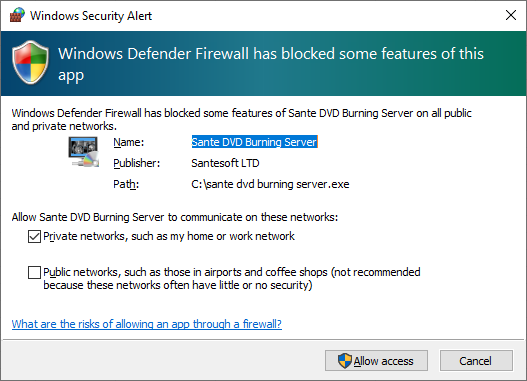
- When the program starts, Windows may ask whether to add it to the firewall exception list. If you declined, add the program manually.
- If the two nodes (server and client) are on different subnets, make sure the router forwards the program's port correctly.
- If the program can successfully ECHO the other node (client/server) but cannot transfer files, make sure both systems are configured to recognize each other. Add the application's AE Title, IP address, and port to the other node's "Known DICOM Nodes" list. Without this information, the client/server does not know where to send the files.
Check the Program Port
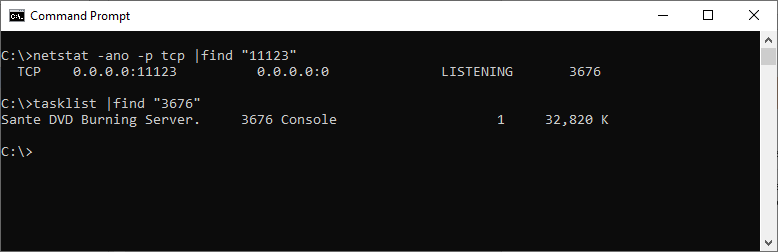
The IP address displayed by the program is assigned by the operating system and cannot be changed by the program. If the system has multiple network interfaces (physical or virtual network adapters), the program may display an IP address other than the one you expect. However, it opens its port on all available network interfaces, not only on the displayed IP address. In such cases, use the netstat utility to verify that the program's port is open and to see which IP address it is bound to.
Run the following command:
C:\>netstat -ano -p tcp |find "11123"
to check whether port 11121 is open and which IP address it is bound to. The last number in the output is the PID of the application that opened the port.
Run the following command:
C:\>tasklist |find "3676"
to identify the application associated with that PID.