




 Store, archive, manage, view, and burn medical imagesSante PACS Server is a DICOM 3.0-compliant PACS server, a Modality Worklist server, an HTTP (web) server for DICOM files and a CD/DVD burning and printing server that offers high performance and reliability at an affordable price. It provides connectivity to all DICOM modalities (CT, MR, US, CR, NM, XA, MG, DX, etc.). DICOM images can be reviewed using Sante PACS Viewer, the system’s built-in, full-featured DICOM viewer. The built-in web server can be used as a free cloud server for DICOM files!An ideal companion to cloud-based solutionsIf you have chosen a cloud-based solution for DICOM file archiving, Sante PACS Server can serve as an ideal companion. It can function as a local backup server for the entire archive, with web-based access, while also retaining older studies locally that do not need to be stored in the cloud. This approach can significantly reduce the monthly cost of the cloud solution.Perpetual LicenseThe program comes with a perpetual license that never expires, with no annual, renewal, or contract fees. Updates, maintenance, and technical support are free. Registered users can download, install, and use every new version at no additional cost.Free demoThe free demo version is fully functional for 90 days. Download it now! Download it now!Features and benefits
The program modulesSante PACS Server consists of four modules:The Database module The program uses a SQL database for data management and can store an unlimited number of patients, studies, series, and images, subject only to available disk space. 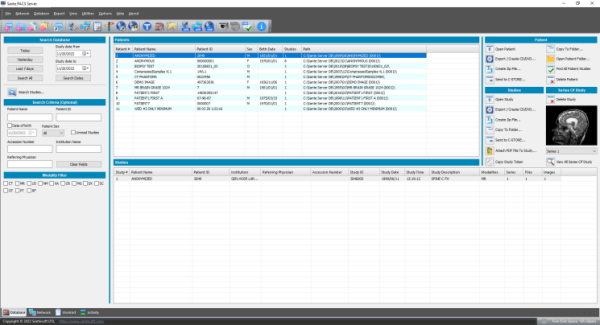 The DICOM Server module The built-in DICOM server supports all the DICOM network services (C-FIND SCU/SCP, C-MOVE SCU/SCP, C-STORE SCU/SCP, C-GET SCU/SCP, C-ECHO SCU/SCP), and is compatible with all modalities (CT, MR, NM, US, XA, MG, CR, DX etc.), all manufacturers and DICOM 3.0 and NEMA 2 file types. It also supports an unlimited number of connections to DICOM nodes and clients. 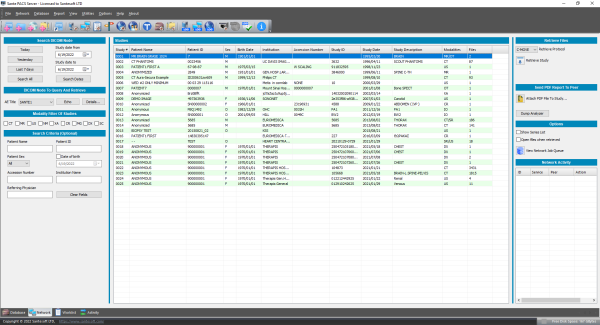 The Worklist Server module The built-in Worklist server receives patient demographics and examination scheduling information from HIS/RIS systems (Hospital Information Systems / Radiology Information Systems) via HL7 messages and makes this information available to modalities and medical scanners through DICOM C-FIND.  The Web Server module The Web Server module allows remote users to connect to the system and search for, retrieve, and review studies stored in the DICOM Server database. It uses HTTP or HTTPS, so users can access their studies through a web browser such as Edge, Chrome, or Firefox. The web server supports secure SSL/TLS connections, allowing users to access DICOM studies from anywhere and use the system as a free cloud server. Users can also upload DICOM files, PDF reports, and HL7 messages. Patients can retrieve their studies without creating an account by using 64-character access tokens.  From the system’s home page, remote users can download and install two free applications for use with the web server: Sante Web Downloader and Sante DICOM Web Viewer. Sante Web Downloader lets users monitor download progress and saves the downloaded studies in a ZIP archive. Users can configure it to open the saved archive in a DICOM viewer of their choice, such as Sante DICOM Viewer Pro or Sante DICOM Editor. The selected viewer must support opening ZIP archives from the command line. For details, see the Sante Web Downloader User Guide. This application is useful for users who prefer a viewer other than Sante DICOM Web Viewer. Sante DICOM Web Viewer also lets users monitor download progress. In addition, it is a high-quality, full-featured, free 2D/3D DICOM viewer with tools for measurements, ROI statistics, MPR, and study/series comparison. It supports workflows involving multiple modalities and manufacturers and includes the features of Sante DICOM Viewer Pro and Sante DICOM Viewer 3D Pro, except for post-processing functions such as anonymization (de-identification).
OHIF ViewerRemote users (physicians and patients) apart from our Sante DICOM Web Viewer can use the OHIF web-based DICOM viewer to review studies. The OHIF DICOM Viewer is a powerful web-based viewer that requires no installation and works on desktop computers, tablets, and mobile devices running Windows, Linux, macOS, iOS, Android, and other operating systems.
Free DICOM viewers for all review workstationsSante DICOM Web Viewer and OHIF DICOM Viewer can be used both remotely and locally through the built-in web server, providing free DICOM viewing at every review workstation, with no additional cost.Cloud supportThe program can export compressed studies to cloud storage services such as OneDrive, Dropbox, and Google Drive, together with a DICOM viewer (Sante DICOM Viewer Lite or another viewer selected by the user).
Program tools, utilities, and proceduresSante PACS Server includes five useful tools, utilities, and procedures:The Migration tool The Migration tool simplifies migration from an existing PACS system to Sante PACS Server. It runs independently, avoiding unnecessary load on the PACS server. It can also import DICOM files from any folder into the database at any time, including files stored on USB flash drives or external hard drives. The Forwarder module This module automatically forwards studies and series from Sante PACS Server to a destination server on a scheduled basis. The Receiver module This module automatically retrieves studies and series from one or more source servers on a scheduled basis. The Routing Rules Routing Rules allow users to configure automatic forwarding of studies and series received from scanners or other servers to diagnostic workstations or backup PACS servers. Automatic CD/DVD burning and label printing When Sante PACS Server receives studies, it can store them on disk and automatically send them to EPSON or PRIMERA robotic disc publishers for CD/DVD burning and label printing. Standard CD/DVD writers and manual burning and printing are also supported.    Sante DICOM Viewer LiteThe CDs and DVDs created by Sante PACS Server include Sante DICOM Viewer Lite for Windows and macOS, a high-quality, full-featured, free DICOM viewer with tools for measurements, ROI statistics, MPR, and study/series comparison. It supports multimodality, multivendor workflows and includes the features of Sante DICOM Viewer Pro and Sante DICOM Viewer Mac, except for post-processing functions such as anonymization (de-identification).  Sante PACS Server PG vs Sante PACS ServerBoth versions offer the same features; the only difference is the database they use. Sante PACS Server PG uses PostgreSQL or MySQL, fully featured, enterprise-grade SQL database engines, instead of the file-based SQLite database used by Sante PACS Server. For medical facilities with more than 3–4 medical scanners, Sante PACS Server PG is a more suitable solution.Minimum Requirements
The optimal server configuration depends on the expected workload. Download the applicationPrice List
Download the application |
 Download it


Download
Download the applicationWhat's new
 What's new in the current version
Online Shop
 Order it now
Written Quotes
Our e-commerce partner, FastSpring, handles requests for written quotes.
 Ask for a written quote
User Guides
The migration procedure
Program Configuration
The built-in Modality Worklist (MWL)
Integration with HIS/RIS software
The built-in HTTP (Web) Server
Study Retrieval by Patients
Attach PDF report files to studies
CD/DVD Burning and Label Printing
Creating SHA-256 Encrypted Media (CD/DVD)
Similar Programs

Sante PACS Server PG has all the features of Sante PACS Server and uses a more powerful SQL database engine (PostgreSQL).
Learn more...
Learn more...

Sante Free PACS Server is a DICOM 3.0-compliant PACS server and a web server for DICOM files,
available free of charge!
Learn more...
Learn more...
 Participate
Copyright © 2026 Santesoft LTD. All rights reserved.